Compromeez 2.0 released with manage company contact, switch to @lucide/vue, and more
First, I would like to apologize for skipping the release of version 1.4 (yes, I did it again. No need to read it like singing Britney Spears' song) and goes straight to announce the version 2.0 release. I can explain. So, please hear me out.
After I released version 1.4 on GitLab, I had planned that I will announce it in the weekend. Alhamdulillah, I got a freelance job so I had to postpone it. While I wait for client's feedback, I continue fixing the bugs on the Compromeez.
Since it almost been a month after the release of version 1.4 and switching to @lucide.vue is a breaking change, I thought that it would be better to skip announcing version 1.4 release and release the version 2.0 instead.
So, here it is. Say hi to Compromeez 2.0 👋
Manage company contact details
After the website goes live, the developer should not be bothered with trivial task like updating the company contact details like change company address, phone, or social media accounts. Someone from the company should be able to do it without contacting the developer.
So, I added the feature to edit the contact details on the admin page.
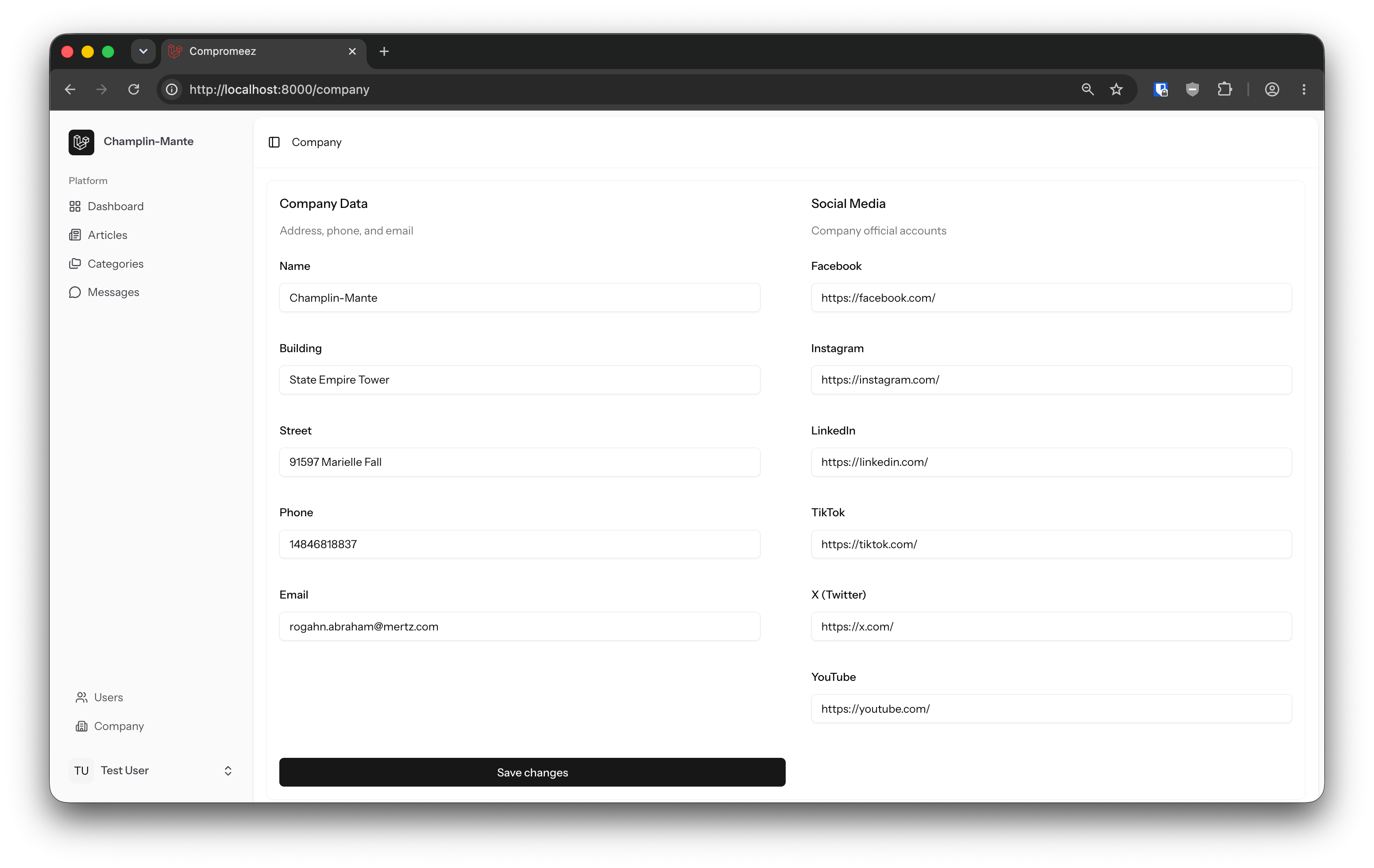
The address, phone, email, social media accounts on the footer section should show same information as in the company contact details.
One less thing to be worried about after the project delivered and may Allah bless your sleep. Aameen..
Switch to @lucide/vue
Following the deprecation of lucide-vue-next, I decided to use its successor @lucide/vue right away.
Disable registration
I forgot to remove the registration feature completely on the previous releases so I want to make sure it is no longer shipped in this release.
We cannot just sign up to some company website and randomly posting articles, right? 🤔
Brand icons
When developing the social media section, I found that LinkedIn icon is not available on Lucide icon sets. Turns out that they no longer supporting brand icon.
Maashaa' Allah laa quwwata illa billah, I found that @iconify/vue supports brand icons! 🙌
You can choose icons from Iconify or Icônes. Both offer similar catalogue for icon sets.
Here is how to use icon component as per instruction from Iconify documentation:
<script setup lang="ts">
import { Icon } from "@iconify/vue";
</script>

<template>
  <Icon icon="mdi-light:home" />
</template>
Bug fixes and others
I fixed some bugs and cleaned some code for smoother development experience.
I also did regular updates for both PHP and Node.js packages to keep the application secure and up-to-date.
For more details about what bugs that have been fixed and what have changed, visit the GitLab release page.
Upgrade guide
Run npm install after upgrading to install the new dependencies and check for pages that use icon components. You should use @lucide/vue instead of lucide-vue-next.
I recommend to use aliased names ending with Icon when using icon component for better code readability and context awareness. For example, HouseIcon instead of House.