Alabaster Themes 2026 Q3 Update
I regularly updating my open source projects and this is the first time I'm publishing it on my blog. Starting from now, I will publish the regular updates on this blog, inshaa Allah.
I'm doing this so people would know that my projects are well maintained though every update might not bring noticable changes.
Let's see what's new in this update.
What's new
- Node.js packages are updated to the latest version except
better-sqlite3is still kept at version 12 because@nuxt/contentis not ready yet to support version 13. - Add
.nvmrcfile to automatically select Node.js runtime version on both local development and Cloudflare Pages deployment.
Failed deployment
I had a several deployment errors when I pushed some commits to the development branch. When I checked on the Cloudflare dashboard, the UI of the dashboard page is slightly different than the last time I logged in, especially the deployment settings page.
I updated the Node.js version for building the application to version 24 so it will match with the version installed on my computer.
Since I created a development branch for this update and pushed it to GitLab, Cloudflare detected the new branch and deployed the Preview version. Soon after I pushed the new branch, I got an email notifying me that the deployment was failed.
I checked the error log and it looks like this:
2026-08-25T14:14:50.281749Z Cloning repository...
2026-08-25T14:14:53.255884Z warning: redirecting to https://gitlab.com/findrakecil/alabaster-themes.git/
2026-08-25T14:14:53.25635Z  From https://gitlab.com/findrakecil/alabaster-themes
2026-08-25T14:14:53.256473Z  * branch            011b853f7926da9c57bcfb1453d45b8cb5beeebb -> FETCH_HEAD
2026-08-25T14:14:53.256535Z
2026-08-25T14:14:53.339495Z HEAD is now at 011b853 fix: build error
2026-08-25T14:14:53.340589Z
2026-08-25T14:14:53.72842Z
2026-08-25T14:14:53.732335Z Using v2 root directory strategy
2026-08-25T14:14:53.797824Z Success: Finished cloning repository files
2026-08-25T14:14:57.417083Z Checking for configuration in a Wrangler configuration file (BETA)
2026-08-25T14:14:57.418777Z
2026-08-25T14:14:57.714389Z No Wrangler configuration file found. Continuing.
2026-08-25T14:14:58.117882Z Detected the following tools from environment: npm@10.9.2, nodejs@22.16.0
2026-08-25T14:14:58.118632Z Installing project dependencies: npm clean-install --progress=false
2026-08-25T14:15:02.26971Z  npm error code EBADPLATFORM
2026-08-25T14:15:02.270103Z npm error notsup Unsupported platform for @oxc-parser/binding-android-arm-eabi@0.147.0: wanted {"os":"android","cpu":"arm"} (current: {"os":"linux","cpu":"x64"})
2026-08-25T14:15:02.270219Z npm error notsup Valid os:   android
2026-08-25T14:15:02.270273Z npm error notsup Actual os:  linux
2026-08-25T14:15:02.270317Z npm error notsup Valid cpu:  arm
2026-08-25T14:15:02.270357Z npm error notsup Actual cpu: x64
2026-08-25T14:15:02.271323Z npm error A complete log of this run can be found in: /opt/buildhome/.npm/_logs/2026-08-25T14_14_59_654Z-debug-0.log
2026-08-25T14:15:02.339404Z Error: Exit with error code: 1
2026-08-25T14:15:02.34081Z      at ChildProcess.<anonymous> (/snapshot/dist/run-build.js)
2026-08-25T14:15:02.341058Z     at Object.onceWrapper (node:events:652:26)
2026-08-25T14:15:02.341272Z     at ChildProcess.emit (node:events:537:28)
2026-08-25T14:15:02.341366Z     at ChildProcess._handle.onexit (node:internal/child_process:291:12)
2026-08-25T14:15:02.352819Z Failed: build command exited with code: 1
2026-08-25T14:15:03.489623Z Failed: error occurred while running build command
At first I confused about npm error code EBADPLATFORM error message. It was stated on the documentation that Cloudfare Pages uses Ubuntu 22.04 for build image and maybe for deployment too. Why it build for Android ARM architecture?
After deliberate debugging on the deployment setting page, I found out that I was only updated the Production environment. There was an environment select input that I missed 😅
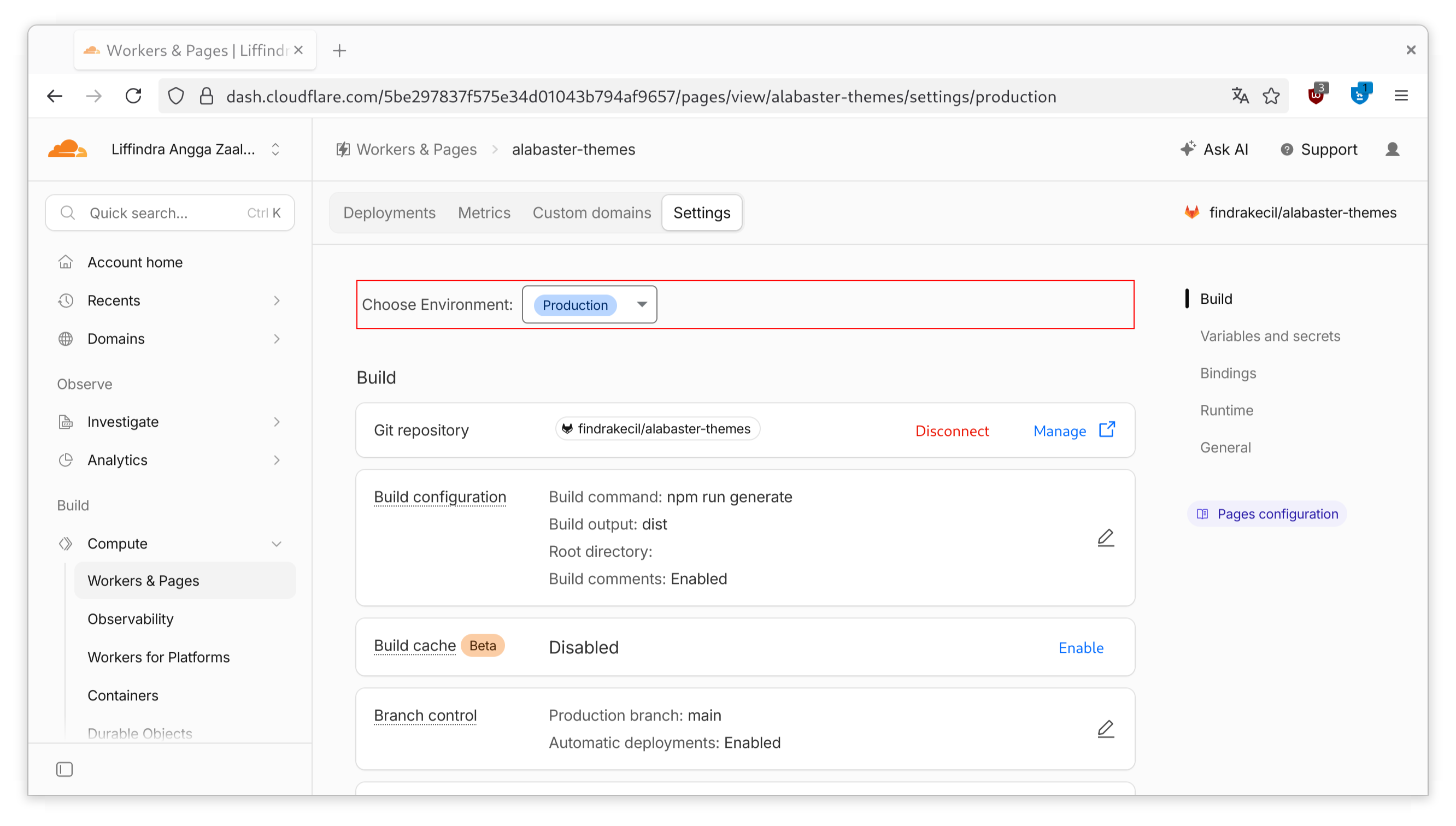
I knew that it was still using Node.js version 22 from the error log and I was still didn't get why it wasn't changed although I have defined the NODE_VERSION environment variable.
After I defined NODE_VERSION environment variable in Preview deployment environment, I retry the build process and this time build process was success.
Missed Merge Request
A GitLab user @YesJustWolf submitted a merge request to Alabaster Themes repository 4 months ago and I didn't know it 🤦🏻.
I realized it when I want to merge 2026 Q3 Update branch into main branch, there was already one merge request count. I opened it and shocked that it was submitted months ago and I didn't know anything about it. No notification on GitLab and on my email. Maybe I was skipped it 🤷🏻.
Turns out that I discovered his theme on June, 2026 and added it into the collection without knowing that he already submit merge request for it months ago. You can see it in this commit.
I feel bad for him and close his merge request with an apology. I'll make sure this won't happen again in the future 😅
Try Alabaster
If you are looking for a clean and minimal syntax highligting theme or color scheme for your IDE, text editor, or terminal, try Alabaster. Get it for your favorite app on the Alabaster Themes website.